
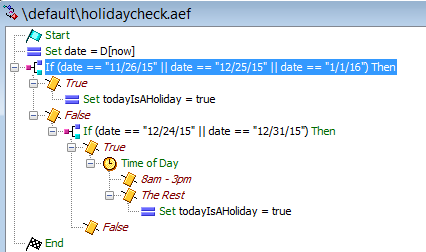
We have a call center that closes early on some holidays, so I needed to add a time-of-day check to my holiday check, but I was having trouble finding an answer online. I started experimenting with a way to add the time-of-day check to the holiday check. I ended up figuring out a different way to perform a holiday check that doesn’t use an XML document. To me, the script seems much cleaner, and I’m able to add a time-of-day check to it. It’s also clear in the script which days are holidays without having to reference a second document. I’m not sure why more people don’t use this method—is there something I’m missing? I’ve tested it, and it works perfectly. Below is how I built the script. Keep in mind that this is a sub-script referenced by the actual call group script.
I started by creating two variables.
Date | string | “”
todayIsAHoliday | Boolean | false This matches the same variable from the parent script that will play the holiday message.
Then the first step in the script is a “set” step.
Set date = D[now] This is used to ensure that the date is displayed in a format that is easy to match.
Next, I use an “If” step where I list the days that are holidays using (date == “11/26/15” || date == “1/1/16”)
If true, I use the “Set” step to set `todayisaholiday` to true.
If false, I proceed to another “If” step where I list the days the call center closes early. If true, it checks the time of day against the operating hours; if the call center is open, it does nothing, and otherwise, it sets `todayIsAHoliday` to true.
"False" does nothing, and then the script ends.
This logic is much shorter and simpler than reading an XML document and then using an increment loop to iterate through all the holiday entries.
